Telegram chats protected from fake admins
They pretend to be you. The bot bans them.
Impersonation Guard is a Telegram bot that bans the accounts and channels copying the name, @username or profile photo of your admins or your chat.
Free for chats up to 500 members. Works in English and Russian.
- The report comes to you
In your DMs or in the admins' group — not in the chat itself. Members see nothing.
- With the evidence
Under the report, a copy of the impostor's message: you see what they were up to.
- Banned in all your chats
Copy an admin and the account is banned everywhere that admin protects a chat.
- Wrong call? One button
“Unban” and “Whitelist” right there in the notice.
The bot compares three things — and sees through their copies
Each time someone joins a chat, writes in it or edits a message, the bot compares them with your admins, with the chat itself and with its linked channel.
Name
Lookalike letters from other alphabets, stylized letters and invisible characters are brought back to plain ones before the comparison.
Ivan PetrovrealІvan Рetrovcopy@username
A zero for an “o”, extra underscores and digits at the end don't hide anyone.
@ivan_petrovreal@ivan_petr0v2024copyAvatar
Matched by a visual fingerprint: a re-saved or resized copy is the same picture.
Ivan PetrovrealIvan P.copy
What you get from the bot
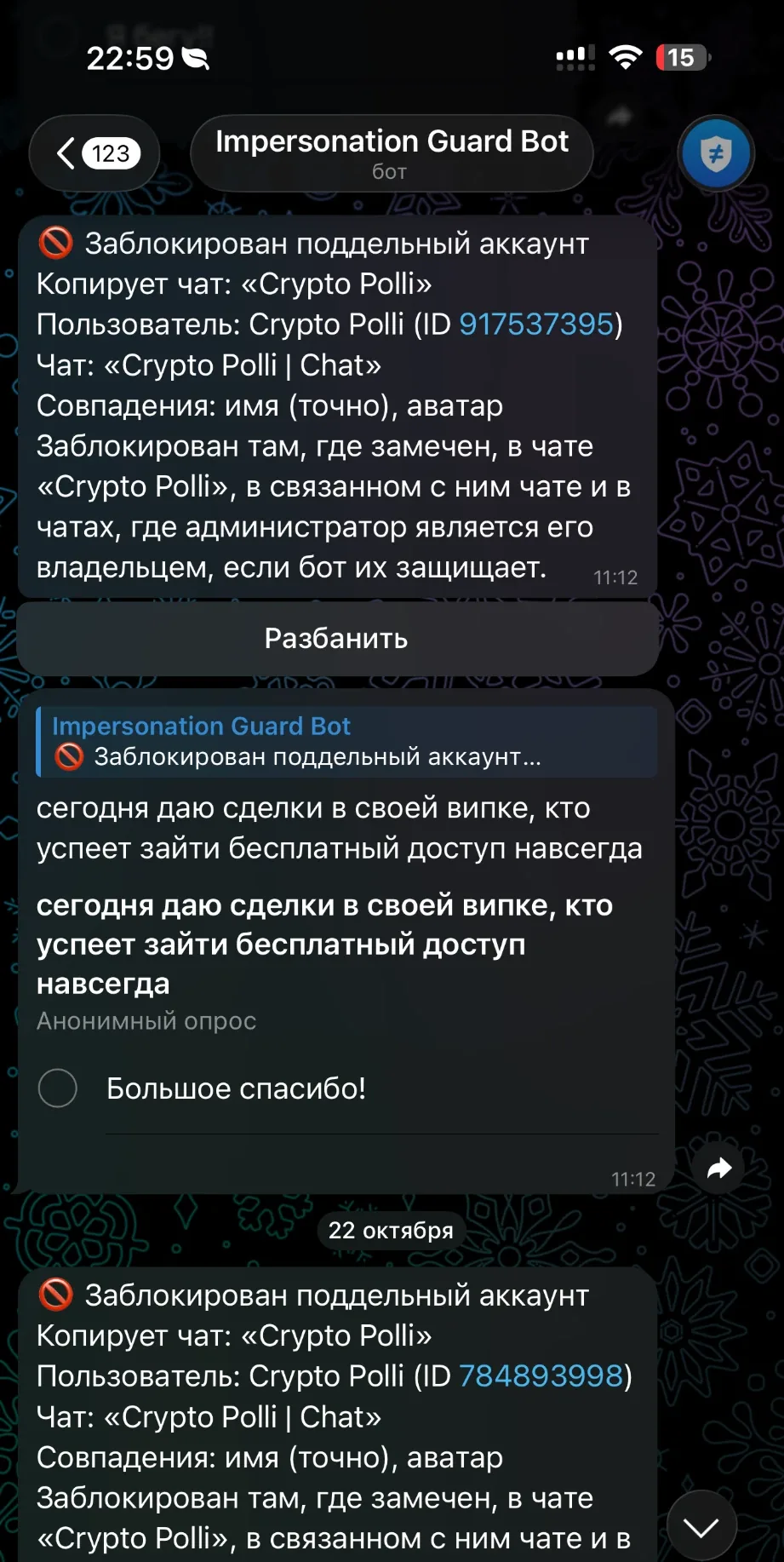
Reports about impostors go to the admins, in private or in your admin group, not into the chat. These are the bot's own messages, word for word.
🚫 Impostor banned
Copies: Ivan Petrov User: Іvan Рetrov (ID 7215408816, @ivan_petr0v) Chat: “Moonfield Community” Matched: name (exact), avatar Banned in every chat where Ivan Petrov is an admin.
Hi! I'm the admin of Moonfield. Message me privately to claim your airdrop 🎁
⚠️ Suspicious sender
Looks like: Ivan Petrov User: Ivan Petrov ✅ (ID 6620184351, @petrov_support) Chat: “Moonfield Community” Matched: name (similar) Muted until you decide.
Start in three steps
A couple of minutes, and the bot starts checking.
Press Start in the bot
Open @impersonation_guard_bot and press Start. The bot can only write to you after that, and your notifications arrive there. A chat with nobody to notify isn't protected, so at least one admin has to do this (or an admin group has to be linked, see step 3).
Add it to your chat as an admin
Add the bot to a group. Telegram lets you pick the chat and pre-selects the only two rights the bot needs: delete messages and ban users. For a channel, use the “Add to channel” button the bot shows after Start. If the channel has a discussion group, add the bot to both.
Choose where notifications go (optional)
Protection is on as soon as step 2 is done. Notifications come to each admin who pressed Start. To get them in a shared admin group too, add the bot there and send
/link@impersonation_guard_bot. Fine-tune everything with/settings.
Pricing
Chats up to 500 members are protected for free. A bigger chat gets a 14-day free trial of everything; after that it needs a plan, paid in Telegram Stars (⭐).
Free
0 Starsforever
Chats up to 500 members. Full protection, automatic bans included.
Pro
500 Starsevery 30 days
One chat of any size. A channel and its discussion group count as one chat.
First 14 days free
Network
2,500 Starsevery 30 days
Up to 10 chats of any size, which you can swap at any time.
First 14 days free
- The free days come once per chat over 500 members, with everything included, and a reminder 3 days before they end.
- Chat size is the larger of a channel and its discussion group.
- Plans are Telegram Stars subscriptions. They renew every 30 days until you cancel, any time in
/plan; the plan then stays until the end of the period you paid for. - A chat over 500 members with no trial or plan still gets impostors spotted, but the bot asks the admins instead of banning on its own.
- Refunds and the exact terms: see the FAQ and the Terms.
FAQ
What exactly does the bot look at?
Who joins a chat, who writes in it and who edits a message. It compares that sender's display name, @username and avatar with your admins, your chat and its channel. It doesn't scan your member list, and it doesn't store messages. When it acts on an impostor it can send the admins a copy of the message as evidence; you can switch that off in settings.
What can't it do?
Telegram doesn't tell bots when someone changes their name, @username or avatar. A person who changed their profile to copy an admin is caught the next time they write, edit a message or join, not at the moment of the change.
Avatars hidden by privacy settings can't be compared. Telegram doesn't tell bots who authored a post in a channel itself, so those posts aren't checked.
The bot works inside your chats. It can't see or stop private messages sent to your members. What it does is keep impostors out of your chats, so they can't use your chat and its member list as a stage: it bans them or, in a chat of more than 500 members with no trial or plan, asks your admins to.
Matching is automatic: it can miss an impostor or take someone else for one. That is why borderline cases go to your admins.
Will it ban my own admins?
No. A chat's admins are never checked. If the bot bans someone by mistake, press Unban on the notification, and Whitelist tells it that the account is fine.
Can I tune it for my chat?
Yes. Add blacklist phrases such as “support” or “admin”, protect a partner's channel by its @username, and choose per chat what the bot does for each kind of match. All of it is in /settings.
What data does it keep?
The IDs and titles of the chats it protects; their admins' IDs, names and @usernames; cases (the sender's ID, name, @username and an avatar hash, only for senders who look like an admin or the chat); whitelist entries; the IDs and language of people who pressed Start; and payment records. It keeps no messages and no pictures. Everything is stored with Supabase. We don't sell it, and we delete yours on request via support. Details: Privacy Policy.
What happens when a plan ends?
The chat keeps full protection until the end of the period you paid for, even if you cancelled the renewal. After that, a chat of up to 500 members stays free. A bigger chat is still watched, but the bot sends the admins requests instead of banning on its own, and you press Ban yourself. Your settings stay, and a new plan brings automatic bans back.
How do I cancel?
Send /plan to the bot in a private chat and press the button to cancel the renewal. You can resume it until the plan runs out.
Can I get a refund?
On request, we refund the payment for the current period if protection didn't work as described. Send /paysupport to the bot to see how to ask.
How do I reach support?
Send /paysupport to the bot: it shows the contact and what to include (which chat it is about, what went wrong, and the payment ID if you have it). Telegram's own support can't help with purchases made in the bot.
Which languages does it speak?
English and Russian. Each person chooses with /language, and each chat has its own language for notifications in its settings.
Put the bot in your chat
It starts checking from the very next message. Free for chats up to 500 members.